Features · Your backend
No backend of its own.
Yours, through one small interface.
Fieldia draws, checks and runs the page; your server keeps the data. They meet in a data source of a few optional methods, so a REST API, GraphQL, an ERP or local storage all fit. Nothing is sent anywhere you did not write.
interface DataSource {
  load?(request): Promise<Values>;              // read a record
  save?(request): Promise<SaveResult>;          // create or update it
  onchange?(request): Promise<OnchangeResult>;  // fill in others after a change
  search?(request): Promise<RelatedRecord[]>;   // find records to link to
  list?(request): Promise<ListResult>;          // a list's rows, searched and sorted
  submit?(request): Promise<SubmitResult>;      // a form's answers
}
Your server fills in the rest
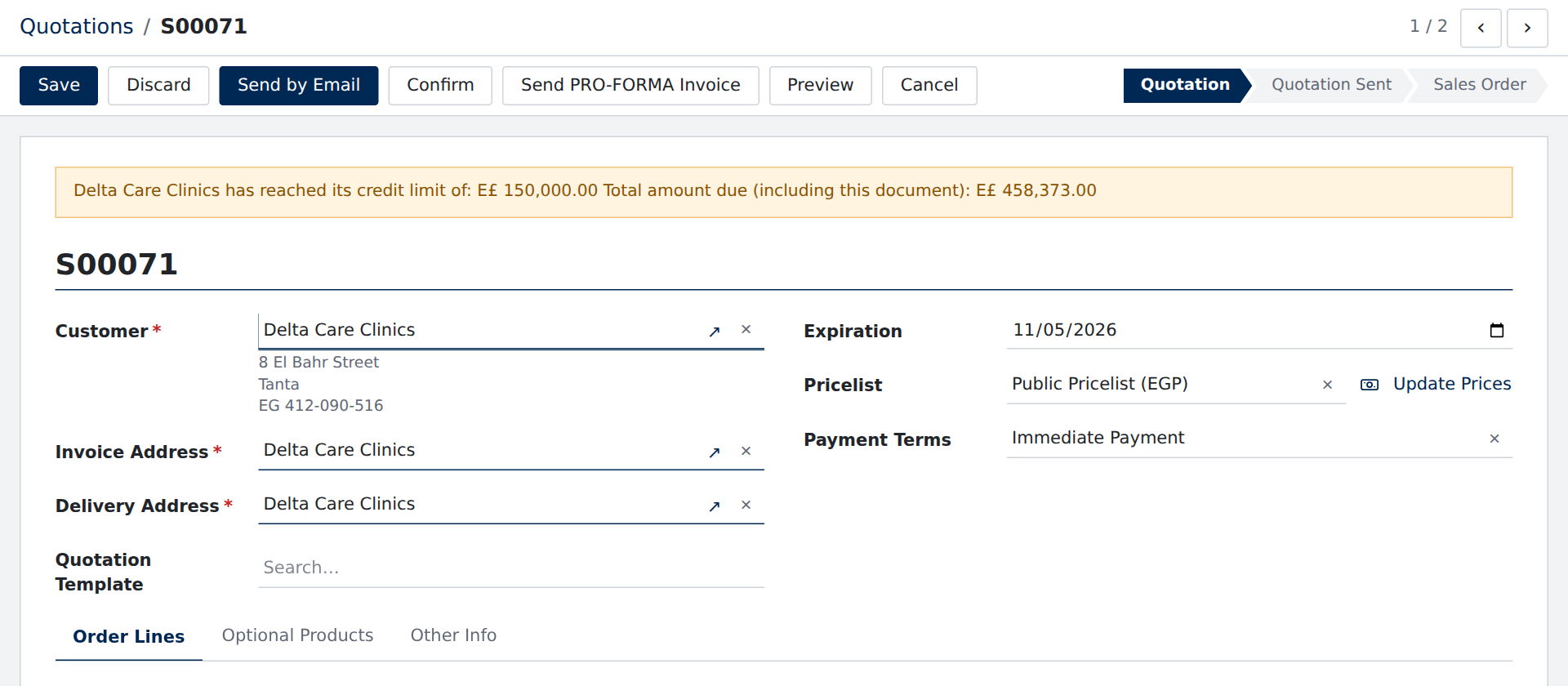
Change one field, and your server answers for the others
When a value changes, your onchange gets the record and answers with the fields to update and, if it likes, a warning. Here the customer changed: the addresses, pricelist and terms followed, and the credit limit spoke up.
- onchange gets what changed and every value
- It answers with values to set, and an optional warning
- A warning shows without blocking, and goes with the next answer
- Answers to older questions are ignored as people keep typing
Refusals land where they belong
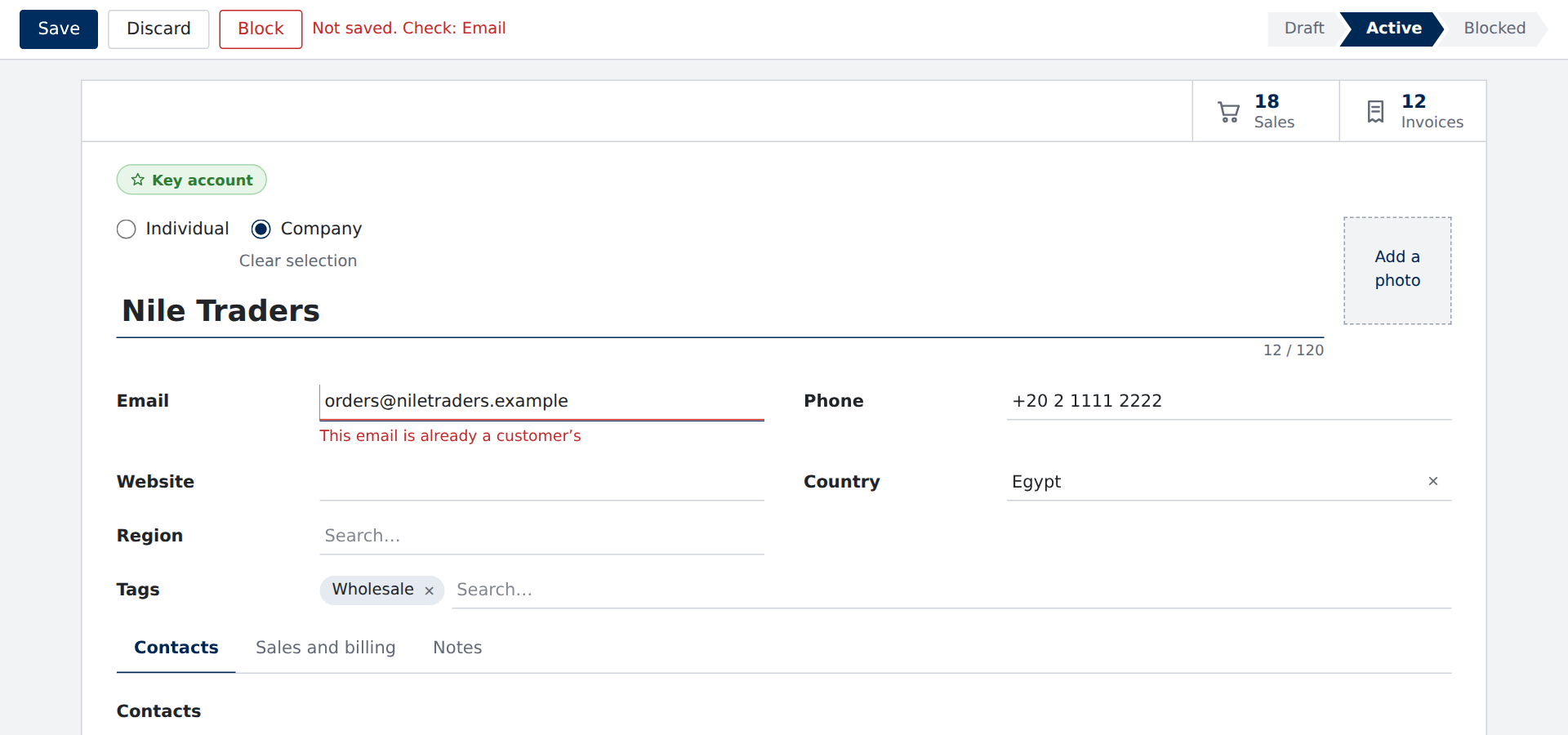
A save your server refuses, said on the field it is about
Throw saveRefused from save: problems with fields show under those fields and the cursor goes to the first; a business rule shows in a dialog; a network failure gets a banner with Retry.
- saveRefused({ kind: "fields", fields }) under each field
- A business rule in a dialog, a network failure with Retry
- The refusal said where the person looks, and to screen readers
- Nothing lost: the person’s changes stay, ready to fix
A REST API in a few lines
An adapter is a few functions, written once
Each method is optional: a survey needs only submit, a record load and save, a link search. The demos run on the memory data source, a good way to try a page before a backend exists.
- Every method optional: use only what a page needs
- save gets only the changes, and all the values
- createMemoryDataSource for trying pages and for tests
- Works with REST, GraphQL, an ERP’s RPC, or local storage
export const api: DataSource = {
  async load({ model, id }) {
    return (await fetch(`/api/${model}/${id}`)).json();
  },
  async save({ model, id, values }) {
    const response = await fetch(id === null ? `/api/${model}` : `/api/${model}/${id}`, {
      method: id === null ? 'POST' : 'PUT',
      headers: { 'content-type': 'application/json' },
      body: JSON.stringify(values),
    });
    const saved = await response.json();
    return { id: saved.id, values: saved };
  },
  async search({ model, query, limit = 8 }) {
    const rows = await (await fetch(`/api/${model}?q=${encodeURIComponent(query)}&limit=${limit}`)).json();
    return rows.map((row) => ({ id: row.id, label: row.name }));
  },
};
Kept right
What your data can count on
- Yours aloneFieldia has no server and sends nothing on its own: every request is one you wrote.
- Only the changesA save says what changed since the record loaded, and every value too.
- Pages are dataA page is JSON, checked when it loads; it can come from your database or a designer.
- Tested both waysThe same data source runs the demos and the 1,600 browser tests.
Connect your first page this afternoon
Start on the memory data source, then write the three or four methods your page needs.